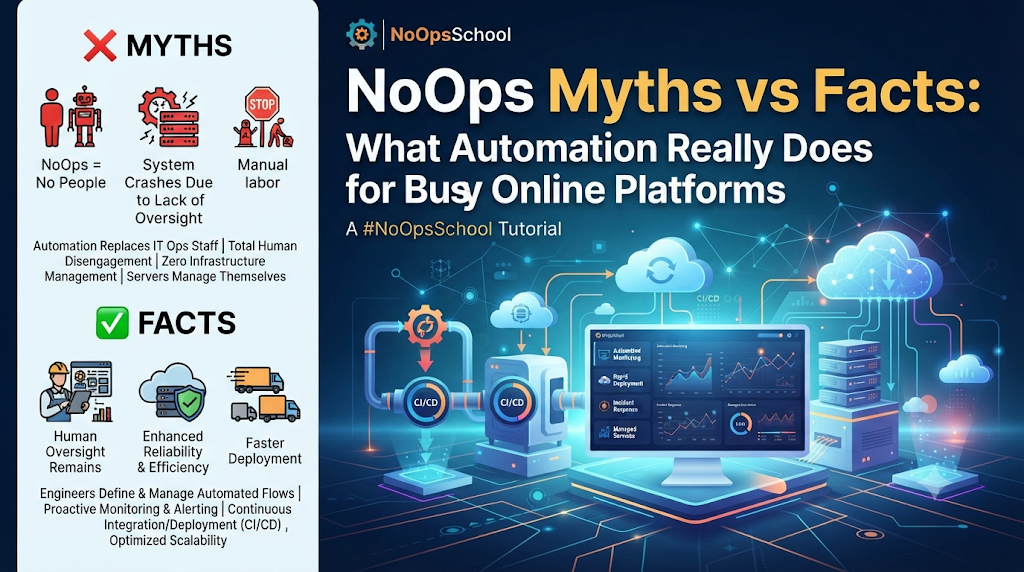
Online platforms that serve live users have a tough job. Traffic can jump within minutes. Sessions must stay fast. Security must hold up all day, every day. A slow page or a short outage is noticed right away.
It is no surprise that teams running such platforms are interested in NoOps. But the topic attracts a lot of loose claims. This article goes through seven common myths and replaces each with a practical, honest explanation.
First, a Plain Definition
Before the myths, a quick answer to the question many readers start with: what is NoOps? It is an approach in which automation and managed cloud services handle routine operations work, such as creating servers, releasing updates, scaling, and recovering from common failures. People still design the system, set the rules, review results, and answer for the outcome.
Myth 1: “NoOps means no operations team”
The fact: Operations work does not vanish. It changes shape.
When routine tasks are automated, people spend less time clicking through consoles and more time on design, reliability targets, security reviews, and capacity planning. Someone must still own each service, respond when automation meets a case it was not built for, and decide what is safe to automate. A platform with no accountable humans is a risk, not an achievement.
Myth 2: “NoOps replaces DevOps”
The fact: The two ideas overlap, and many teams use both.
In the NoOps vs DevOps debate, the useful distinction is one of emphasis. DevOps is a working culture where developers and operations share responsibility for software from build to run. NoOps pushes the automation side further, aiming to reduce hands-on operational work as much as the system and its rules allow. Shared ownership, code review, and blameless post-incident reviews are DevOps habits that stay valuable in a highly automated setup.
Myth 3: “Auto-scaling handles any traffic spike by itself”
The fact: Auto-scaling helps, but only when the whole system is built for it.
A platform is a chain, and the weakest link sets the limit. Adding more application servers does not help if the database cannot take the extra load. Good designs usually include:
- Stateless application servers, so any copy can serve any user. Session data lives in a shared store such as Redis.
- Load balancers that spread requests and stop sending traffic to unhealthy servers.
- Caching and content delivery networks that serve repeated content without touching the main servers.
- Queues that absorb sudden bursts of work, so slower tasks run in the background.
- Database planning, including read replicas and careful connection limits.
Scaling also takes time. New servers need to start, warm up, and pass health checks. Teams often keep some spare capacity ready for known busy periods instead of waiting for the scaler to react.
Myth 4: “Self-healing means problems fix themselves”
The fact: Self-healing covers a narrow set of known failures.
Kubernetes, for example, uses liveness and readiness checks. If a container stops responding, it can be restarted. If it is not ready, traffic is held back until it is. That is very helpful for crashes and stuck processes.
It does not fix a memory leak, a slow query, or a bad release. A container that crashes every ten minutes will be restarted forever, which hides a real defect. Good teams alert on repeated restarts and investigate the cause. Automation buys time, and people use that time to find the root problem.
Myth 5: “Automation makes security automatic”
The fact: Automation makes good security habits easier to repeat. It does not replace them.
Useful practices include:
- Immutable builds. Instead of patching servers by hand, build a new image, test it, and replace the old one.
- Secrets management. Keep passwords and keys in a dedicated tool, such as HashiCorp Vault or a cloud provider’s secrets service, and rotate them regularly.
- Policy as code. Tools like Open Policy Agent can reject risky configurations, such as public storage, before they reach production.
- Least privilege. Give every automation tool and service only the access it needs.
- Traffic protection. Web application firewalls, rate limits, and DDoS protection services help absorb hostile traffic.
Automation tools also become attractive targets because they hold powerful permissions. Protect their credentials carefully and review their access often. Platforms in regulated sectors must follow the rules that apply to them, and compliance decisions remain a human responsibility.
Myth 6: “NoOps always saves money”
The fact: Savings are possible, but only with monitoring.
Automation can reduce wasted time and idle servers. It can also raise bills if limits are loose. A scaler without a maximum, a forgotten test cluster, or heavy logging can all add cost quietly. Practical controls include cost tags on resources, budget alerts, regular reviews of unused resources, and cost estimates added to infrastructure change reviews.
The table below shows where each concern usually sits.
| Concern | Typical NoOps practice | Common tool examples |
|---|---|---|
| Repeatable environments | Infrastructure as code | Terraform |
| Safe releases | CI/CD with gradual rollout and rollback | GitHub Actions, Argo Rollouts |
| Keeping systems in the intended state | GitOps | Argo CD, Flux |
| Spotting problems early | Metrics, dashboards, alerts | Prometheus, Grafana |
| Handling load changes | Autoscaling with limits | Kubernetes autoscalers, cloud scaling groups |
| Preventing risky changes | Policy as code | Open Policy Agent |
| Protecting credentials | Secrets management | HashiCorp Vault, cloud secret stores |
These are examples, not recommendations. Check current documentation and fit before choosing any tool.
Myth 7: “Anyone can run NoOps with a few tools”
The fact: The tools are only the visible part. The skill is in how they are combined.
Teams need working knowledge of Linux, networking, containers, cloud services, infrastructure as code, monitoring, and security. They also need judgment about what to automate and what to keep manual for now. People who want to build these skills can look at structured learning. NoOpsSchool, for instance, describes a NoOps training course range and certification tracks aimed at engineers, architects, managers, and professionals. Whichever provider you consider, check the official page for the syllabus, hands-on lab content, exam format, fees, and validity. Do not rely on assumptions about these details.
- If you plan to build and run systems, look for NoOps engineer certification with plenty of practical work.
- If you plan to design platforms, look for NoOps architect training that covers trade-offs such as reliability, cost, and security.
- If you lead a team, a NoOps manager certification should focus on planning, risk, and measuring results.
A Short Example
Picture an online platform that streams live events. This is an invented example. Traffic is low most of the day, then climbs sharply when an event starts. A well-prepared team might:
- Define the Terraform code for the whole environment, so a second region can be created from the same files.
- Keep application servers stateless and place session data in a shared store.
- Test the scaling rules ahead of time with simulated traffic.
- Add alerts for user-facing signals, such as failed connections and slow start times.
- Use a gradual rollout for updates, avoiding releases during peak periods.
- Review the event afterward and adjust limits and alerts.
Nothing here is magic. It is careful design, regular testing, and steady improvement.
When Outside Help Makes Sense
Some organizations prefer to bring in experts for a defined piece of work. NoOps consulting services often begin with an assessment of current operations, followed by an automation plan and staged implementation. If you decide to hire NoOps freelancers, a few checks help:
- Ask for a small, paid trial task with a clear outcome.
- Test their experience with the exact tools you use.
- Agree on access limits and remove access when the work ends.
- Require documentation and handover of all code.
- Be cautious of promises such as “zero downtime” or guaranteed savings.
Questions Readers Ask
Is NoOps suitable for small platforms?
Yes. Managed cloud services and simple automation can help small teams, as long as monitoring stays in place.
Does it work for real-time applications?
It can, but real-time workloads need careful attention to latency, connection handling, and regional placement.
What should we automate first?
Begin with repeatable, low-risk tasks, such as environment creation and test pipelines.
How do we know it is working?
Track measures such as release frequency, time to recover, error rates, and the amount of manual work remaining.
Do we still need on-call staff?
Usually yes. Automation reduces the number of pages, but people still handle new and unclear problems.
Final Thoughts
Strip away the myths and a clear picture remains. NoOps is a practical way to give repeated operations work to machines, so people can spend their time on the harder problems. It brings real benefits, such as steadier releases, faster recovery, and fewer repetitive tasks, but it also brings new responsibilities: cost control, tighter access rules, and regular testing.
The best way to begin is modestly. Choose one repeated task, automate it carefully, measure the result, and write down what you learned. Then build on it. Whether you grow the skills in-house through training, bring in experienced professionals for a focused job, or do both, keep one thing constant: a named person responsible for every automated action.
Platforms that earn trust do it the slow way, through small improvements made safely and checked often.
